
ASUS XG-C100C PCI Express 10-Gbps Ethernet Fiber Network Adapter, backward compatible with 5/2.5/1 Gbps and 100Mbps, built-in QoS
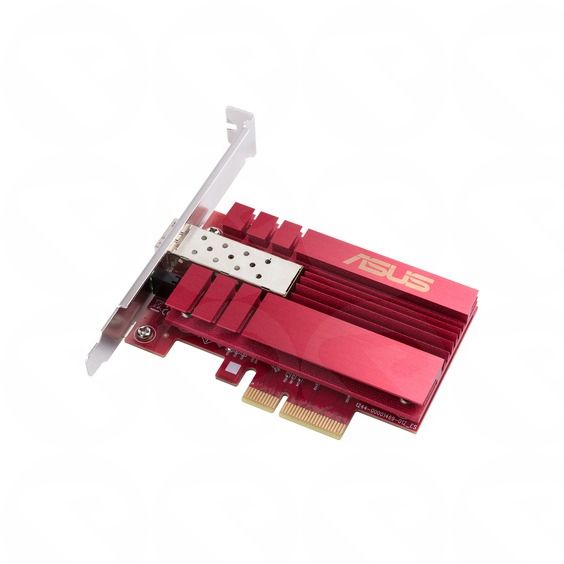
Add fast wired networking to a compatible desktop PC with the ASUS XG-C100C PCIe 10GbE adapter. Its RJ45 10GBase-T port supports speeds up to 10Gbps and is backward compatible with 5, 2.5, 1Gbps and 100Mbps Ethernet. Built-in QoS can prioritize supported gaming traffic. This is a copper Ethernet adapter, not a fiber or SFP+ card.
ASUS XG-C100C 10GbE PCIe Network Adapter
Add fast wired networking to a compatible desktop PC with the ASUS XG-C100C PCIe 10GbE adapter. Its RJ45 10GBase-T port supports speeds up to 10Gbps and is backward compatible with 5, 2.5, 1Gbps and 100Mbps Ethernet. Built-in QoS can prioritize supported gaming traffic. This is a copper Ethernet adapter, not a fiber or SFP+ card.
Key Features
- 10Gbps wired networking: Supports network speeds up to 10Gbps when used with compatible equipment and cabling.
- Multi-speed compatibility: Supports 10, 5, 2.5 and 1Gbps, as well as 100Mbps Ethernet networks.
- RJ45 10GBase-T port: Connects to standard copper Ethernet cabling; no optical fiber connection is provided.
- Built-in QoS: Quality of Service technology can prioritize supported gaming network traffic.
- PCIe adapter: Installs inside a compatible desktop PC with a suitable PCI Express slot.
- Operating system support: ASUS lists Windows 10/11 and Linux support. Check ASUS support information for driver availability for your operating system.
Specifications
- Product type: Wired PCIe Ethernet network adapter
- Model: XG-C100C
- Maximum network speed: Up to 10Gbps
- Supported network speeds: 10/5/2.5/1Gbps and 100Mbps
- Network technology: 10GBase-T
- Port: RJ45 Ethernet
- Interface: PCI Express
- QoS: Built-in Quality of Service
- Physical dimensions and materials: Not specified in the provided product details.
Material and Finish
Material and surface finish details are not specified in the provided product information. The adapter uses a standard RJ45 copper Ethernet port and does not provide an optical fiber or SFP+ port.
What’s Included
- ASUS XG-C100C PCIe 10GbE network adapter
How to Use
- Check that your desktop PC has a compatible PCI Express slot and that the card fits inside the case.
- Turn off and unplug the computer, then install the adapter according to your PC or motherboard instructions.
- Connect the adapter’s RJ45 port to a compatible Ethernet device, such as a router or network switch, using suitable copper Ethernet cabling.
- Install the appropriate driver if required, then configure the network connection in your operating system.
- To connect at 10Gbps, the other network equipment and cable must also support the required speed. ASUS specifies a minimum Category 5e cable for 10Gbps within a 30m range; actual performance can vary with the cable and network setup.
Compatibility note: This is an RJ45 10GBase-T copper network adapter, not a fiber-optic adapter. The speed you achieve depends on your PC, network equipment, cabling and configuration.
| Part Number | 90IG08B0-MO0B00 |
|---|---|
| EAN / UPC | 4712900620061 |
Sign In